System testing isn’t just another phase in software development—it’s the ultimate checkpoint before your product meets the real world. Done right, it can save millions, prevent disasters, and build trust. Let’s dive into everything you need to know to master this critical process.
[ez-toc]
What Is System Testing? A Foundational Overview
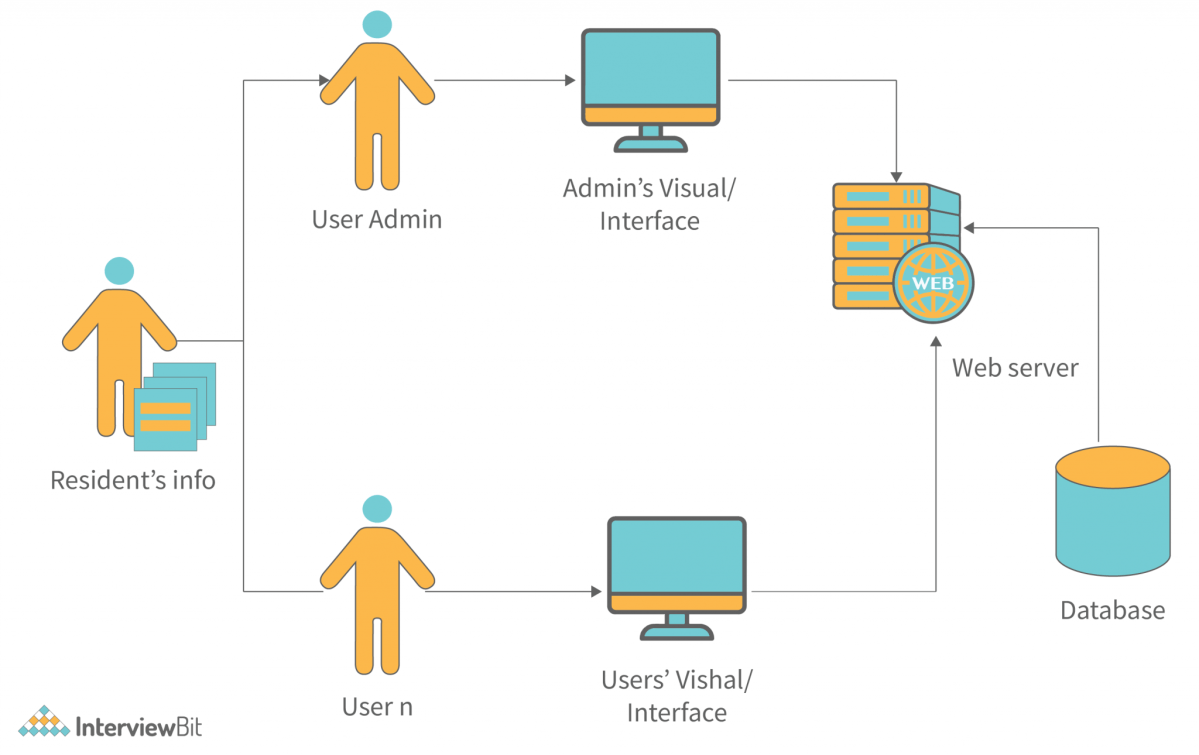
System testing is a high-level software testing phase where a complete, integrated system is evaluated to verify that it meets specified requirements. Unlike unit or integration testing, which focus on individual components or interactions between modules, system testing evaluates the entire system as a whole—just as an end-user would experience it.
The Role of System Testing in the SDLC
System testing sits in the middle to late stages of the Software Development Life Cycle (SDLC), typically after integration testing and before acceptance testing. It acts as a bridge between internal development validation and final user approval. This phase ensures that both functional and non-functional requirements are met under real-world conditions.
- Verifies end-to-end system behavior
- Validates system compliance with business requirements
- Identifies defects missed in earlier testing phases
According to the Guru99 testing guide, system testing is essential for uncovering issues related to data flow, system dependencies, and environment-specific bugs.
Differences Between System Testing and Other Testing Types
It’s easy to confuse system testing with other forms of testing, but key distinctions exist:
- Unit Testing: Focuses on individual code units (e.g., functions or methods).
- Integration Testing: Checks interactions between integrated modules.
- System Testing: Tests the fully integrated application in a complete environment.
- Acceptance Testing: Conducted by users or clients to decide whether to accept the system.
“System testing is the first time the software is tested as a complete entity, making it one of the most critical phases in QA.” — ISTQB Foundation Level Syllabus
Why System Testing Is Absolutely Critical
Skipping or rushing through system testing can lead to catastrophic failures. From financial losses to reputational damage, the stakes are high. This section explores why investing time and resources into robust system testing is non-negotiable.
Preventing Costly Post-Release Bugs
Fixing a bug after deployment can cost up to 100 times more than fixing it during the design phase, according to research by the National Institute of Standards and Technology (NIST). System testing helps catch these issues before they reach production, significantly reducing repair costs and downtime.
- Identifies integration flaws between subsystems
- Exposes performance bottlenecks under load
- Reveals security vulnerabilities in live-like environments
Ensuring Compliance and Regulatory Standards
In industries like healthcare, finance, and aerospace, system testing is not optional—it’s mandated. Regulatory bodies such as HIPAA, FDA, and ISO require rigorous testing protocols to ensure data integrity, safety, and reliability.
- Validates adherence to data protection laws
- Supports audit trails and documentation requirements
- Ensures traceability from requirements to test cases
For example, medical device software must undergo extensive system testing to meet FDA 21 CFR Part 11 regulations.
The 7 Key Phases of Effective System Testing
To execute system testing successfully, teams must follow a structured approach. Here are seven powerful phases that form the backbone of any comprehensive system testing strategy.
1. Requirement Analysis and Test Planning
Before writing a single test case, testers must thoroughly understand the system requirements. This phase involves reviewing functional specifications, user stories, and technical documentation to identify testable conditions.
- Define scope, objectives, and deliverables
- Identify testing types needed (functional, performance, security, etc.)
- Estimate resources, timelines, and risks
A well-documented test plan serves as the blueprint for the entire system testing effort. Tools like JIRA, TestRail, or Zephyr help organize and track planning activities.
2. Test Environment Setup
The test environment should mirror the production environment as closely as possible. This includes hardware, software, network configurations, databases, and third-party integrations.
- Replicate OS versions, browser types, and device configurations
- Configure test data and mock services if needed
- Ensure isolation from development and production systems
Environment discrepancies are a leading cause of “it works on my machine” failures. Using containerization tools like Docker or Kubernetes can standardize environments across teams.
3. Test Case Design and Development
This phase involves creating detailed test cases based on requirements. Each test case should specify inputs, execution steps, expected outcomes, and pass/fail criteria.
- Use techniques like equivalence partitioning and boundary value analysis
- Incorporate both positive and negative test scenarios
- Include usability and edge-case testing
According to Software Testing Help, effective test cases increase test coverage and reduce ambiguity during execution.
4. Test Data Preparation
High-quality test data is crucial for meaningful results. Data must be realistic, varied, and representative of actual usage patterns while complying with privacy regulations.
- Generate synthetic data when real data cannot be used
- Mask sensitive information using data anonymization tools
- Ensure data consistency across test cycles
Tools like Delphix or IBM InfoSphere can automate test data management and provisioning.
5. Test Execution
This is where the rubber meets the road. Testers execute the prepared test cases, log results, and report defects. Execution can be manual or automated, depending on the project’s maturity and complexity.
- Run smoke tests first to validate basic functionality
- Perform regression testing after bug fixes
- Log defects with detailed steps, screenshots, and logs
Automation frameworks like Selenium, Cypress, or Postman are often used for repetitive or data-driven tests during system testing.
6. Defect Reporting and Tracking
Every identified issue must be documented and tracked to resolution. A robust defect tracking system ensures accountability and transparency.
- Assign severity and priority levels (e.g., Critical, High, Medium, Low)
- Link defects to requirements and test cases
- Monitor status through resolution, retesting, and closure
Tools like Bugzilla, JIRA, or Azure DevOps provide structured workflows for managing defects throughout the system testing lifecycle.
7. Test Closure and Reporting
Once all test cycles are complete, a final test summary report is generated. This document outlines test coverage, defect metrics, pass/fail rates, and recommendations for release.
- Measure test coverage against requirements
- Analyze defect density and resolution trends
- Obtain stakeholder sign-off before moving to acceptance testing
The closure report serves as a historical record and helps improve future testing efforts.
Types of System Testing: Beyond the Basics
System testing encompasses various specialized testing types, each targeting different aspects of system behavior. Understanding these types allows teams to build a more comprehensive testing strategy.
Functional System Testing
This type verifies that the system performs its intended functions correctly. It checks features like user authentication, transaction processing, and business logic workflows.
- Validates input-output behavior
- Ensures correct handling of business rules
- Confirms UI interactions match specifications
For example, in an e-commerce app, functional system testing would verify that users can add items to the cart, apply discounts, and complete checkout successfully.
Non-Functional System Testing
While functional testing asks “Does it work?”, non-functional testing asks “How well does it work?” This category includes performance, security, usability, and reliability testing.
- Performance Testing: Measures response time, throughput, and resource usage under load.
- Security Testing: Identifies vulnerabilities like SQL injection, XSS, and authentication flaws.
- Usability Testing: Evaluates user experience and interface intuitiveness.
Tools like JMeter, OWASP ZAP, and LoadRunner are commonly used in non-functional system testing.
Recovery and Failover Testing
These tests evaluate the system’s ability to recover from crashes, hardware failures, or network outages. They are especially important for mission-critical applications.
- Simulate server crashes and measure recovery time
- Test backup restoration procedures
- Validate data consistency after failover
For instance, banking systems must undergo rigorous recovery testing to ensure zero data loss during outages.
Best Practices for Successful System Testing
Following industry best practices can dramatically improve the effectiveness and efficiency of your system testing efforts. These guidelines help avoid common pitfalls and ensure consistent quality.
Start Early: Shift Left Your Testing
The “shift-left” approach encourages testing early in the development cycle. While system testing occurs late, preparing for it should begin at the requirements phase.
- Involve testers in requirement reviews
- Create testable requirements with clear acceptance criteria
- Develop test cases in parallel with development
This reduces last-minute surprises and accelerates the overall testing phase.
Automate Wisely: Balance Manual and Automated Tests
While automation increases speed and repeatability, not all system tests should be automated. Focus automation on stable, repetitive, and high-risk areas.
- Automate regression test suites
- Use manual testing for exploratory and usability checks
- Maintain automated scripts to prevent bit rot
A balanced approach ensures both coverage and flexibility.
Ensure Traceability from Requirements to Tests
Every test case should be linked to a specific requirement. This traceability matrix ensures that no requirement is left untested and helps during audits.
- Use tools like Jama Connect or ReqTest to manage traceability
- Validate 100% requirement coverage before test execution
- Update traceability when requirements change
“Without traceability, you can’t prove that your system meets its intended purpose.” — IEEE 829 Standard for Software Test Documentation
Common Challenges in System Testing (And How to Overcome Them)
Even experienced teams face obstacles during system testing. Recognizing these challenges early allows for proactive mitigation.
Inadequate Test Environment
One of the most frequent issues is a test environment that doesn’t match production. This leads to environment-specific bugs slipping through.
- Solution: Use infrastructure-as-code (IaC) tools like Terraform or Ansible to replicate environments consistently.
- Solution: Implement environment health checks before test execution.
Poor Test Data Management
Lack of realistic or sufficient test data can render tests ineffective. Data privacy concerns also complicate access to real user data.
- Solution: Use synthetic data generation tools like Mockaroo or GenRocket.
- Solution: Implement data masking and subsetting strategies.
Tight Deadlines and Pressure to Release
Business pressures often lead to shortened testing cycles, increasing the risk of undetected defects.
- Solution: Prioritize test cases based on risk and impact (risk-based testing).
- Solution: Communicate risks clearly to stakeholders using defect trend reports.
Tools and Technologies for Modern System Testing
The right tools can transform your system testing from a bottleneck into a streamlined, reliable process. Here’s a look at some of the most powerful tools available today.
Test Management Tools
These platforms help organize test cases, track execution, and generate reports.
- TestRail: Offers customizable dashboards and integrations with JIRA and automation frameworks.
- Zephyr: Native to JIRA, ideal for Agile teams.
- Xray: Another JIRA-based tool with advanced traceability features.
Choosing the right tool depends on your team’s workflow, integration needs, and budget.
Automation and Performance Testing Tools
For executing repetitive tests and simulating real-world loads, automation is key.
- Selenium: Open-source tool for web application automation.
- Cypress: Modern alternative with built-in debugging and faster execution.
- Apache JMeter: Widely used for performance and load testing.
- Postman: Great for API system testing and automated workflows.
According to Gartner, organizations that invest in test automation see a 40–60% reduction in regression testing time.
Security Testing Tools
Security is a critical part of system testing, especially for web and mobile applications.
- OWASP ZAP: Open-source tool for finding security vulnerabilities.
- Burp Suite: Industry-standard for web application security testing.
- Nessus: Used for network and system vulnerability scanning.
Integrating security testing into the system testing phase ensures compliance and protects user data.
The Future of System Testing: Trends to Watch
As technology evolves, so does the landscape of system testing. Staying ahead of trends ensures your testing strategy remains effective and relevant.
AI and Machine Learning in Testing
Artificial intelligence is revolutionizing test creation, execution, and analysis. AI-powered tools can predict high-risk areas, generate test cases, and even self-heal broken scripts.
- Tools like Testim.io and Applitools use AI for visual and functional testing.
- ML models analyze historical defect data to optimize test coverage.
While not a replacement for human judgment, AI enhances efficiency and accuracy.
Shift-Right and Continuous Testing
Shift-right testing involves monitoring and testing in production using real user data. Combined with continuous testing in CI/CD pipelines, it enables faster feedback loops.
- Use A/B testing and canary releases to validate changes in production.
- Integrate system testing into DevOps pipelines for immediate feedback.
This approach reduces the gap between development and real-world usage.
Cloud-Based Testing Platforms
Cloud platforms like Sauce Labs, BrowserStack, and AWS Device Farm allow teams to test across thousands of device-browser combinations without maintaining physical labs.
- Enable scalable, on-demand test execution
- Support geographically distributed testing
- Reduce infrastructure costs
Cloud testing is becoming the norm for enterprises aiming for global compatibility.
What is the main goal of system testing?
The main goal of system testing is to evaluate the complete, integrated software system to ensure it meets specified requirements and behaves as expected in a real-world environment. It verifies both functional and non-functional aspects before the system is released to users.
How is system testing different from integration testing?
Integration testing focuses on verifying the interactions between individual modules or components, ensuring they work together correctly. In contrast, system testing evaluates the entire system as a single entity, testing end-to-end workflows, user interfaces, and system behavior under realistic conditions.
Can system testing be automated?
Yes, many aspects of system testing can be automated, especially regression, functional, and performance tests. Automation tools like Selenium, JMeter, and Postman are widely used. However, certain areas like usability and exploratory testing still require manual intervention for optimal results.
What are the common types of system testing?
Common types include functional testing, performance testing, security testing, usability testing, recovery testing, and compatibility testing. Each type targets a specific quality attribute of the system.
When should system testing be performed?
System testing should be performed after integration testing is complete and all modules have been successfully combined. It precedes user acceptance testing (UAT) and is typically conducted in a staging environment that mirrors production.
System testing is not just a phase—it’s a commitment to quality, reliability, and user satisfaction. By understanding its principles, following structured processes, leveraging the right tools, and adapting to emerging trends, organizations can deliver software that not only works but excels. Whether you’re a tester, developer, or project manager, mastering system testing is essential for building trustworthy, high-performing systems in today’s fast-paced digital world.
Further Reading:
